วันอังคารที่ 9 ตุลาคม พ.ศ. 2561

Raspberry pi Machine Learning with Intel Movidius Neural Compute Stick


Raspberry pi Machine Learning with Intel Movidius Neural Compute Stick ( Myriad2 VPU ) 


What is Machine Learning?


Arthur Samuel described it as: "the field of study that gives computers the ability to learn without being explicitly programmed."


What is Intel Movidius Neural Compute Stick?

The Intel® Movidius™ Neural Compute Stick (NCS) is a tiny fanless deep learning device that you can use to learn AI programming at the edge. NCS is powered by the same low power high performance Intel Movidius Vision Processing Unit (VPU) that can be found in millions of smart security cameras, gesture controlled drones, industrial machine vision equipment, and more.

Technical Specifications
Processor Intel® Movidius™ 2  VPU ( Vision Processing Unit )
Supported Frameworks TensorFlow™, Caffe
Connectivity USB 3.0 Type-A
Dimensions USB stick (72.5mm X 27mm X 14mm)
Operating Temp0° - 40° C

Minimum system requirements
x86_64 computer running Ubuntu* 16.04 or 
Raspberry Pi 3 Model B running Stretch desktop or Ubuntu* 16.04 VirtualBox instance, 
USB 2.0 Type-A port (Recommend USB 3.0), 
1GB RAM, 4GB free storage space


The Intel® Movidius™ Neural Compute Stick (Intel® Movidius™ NCS) is an embedded machine intelligence platform from Movidius, an Intel company. Through software and hardware tools, the Intel Movidius NCS brings machine intelligence and AI out of the data centers and into end-user devices. The Intel Movidius NCS is designed to help democratize the machine intelligence space, and accelerate an age of ubiquitous intelligence devices and systems.


Hardware

  • Raspberry Pi 3B Board with SD card and accessories.
  • Intel Movidius Neural Compute Stick
  • USB Camera 

Software and Library

  • Raspbien Stretch OS
  • OpenCV 3.3.0
  • Python 3.x
  • Intel® Movidius™ NCSDK

Run Demo

Image Classification


Image Classifier with Python GUI 


Video Objects Detection

Reference

https://software.intel.com/en-us/neural-compute-stick/get-started
https://github.com/movidius/ncappzoo/


My Website
email : info@softpowergroup.net  ,amphancm@gmail.com  Tel .+6681-6452400

วันพุธที่ 22 สิงหาคม พ.ศ. 2561

Raspberry pi Face Recognition


Raspberry pi Face Recognition with OpenCV

Built using dlib's state-of-the-art face recognition built with deep learning. The model has an accuracy of 99.38%

Hardware

  • Raspberry Pi 3B Board with SD card and accessories.

Software and Library

  • Raspbien Stretch OS
  • OpenCV 3.3.0
  • Python 3.x
  • dlib library 19.x


First You must install openCV on your raspberry pi.
If you don't have it see this 


Update and Libraries

sudo apt-get update
sudo apt-get upgrade
sudo apt-get install build-essential \
    cmake \
    gfortran \
    git \
    wget \
    curl \
    graphicsmagick \
    libgraphicsmagick1-dev \
    libatlas-dev \
    libavcodec-dev \
    libavformat-dev \
    libboost-all-dev \
    libgtk2.0-dev \
    libjpeg-dev \
    liblapack-dev \
    libswscale-dev \
    pkg-config \
    python3-dev \
    python3-numpy \
    python3-pip \
    zip
sudo apt-get clean


Install Dlib

Before Install dlib. 
Temporary enable a larger swap file size ( For the dlib compile won't fail )


sudo nano /etc/dphys-swapfile

< change CONF_SWAPSIZE=100 to CONF_SWAPSIZE=1024 and save / exit nano >

sudo /etc/init.d/dphys-swapfile restart


Now Install Dlib

git clone https://github.com/davisking/dlib.git

cd dlib


sudo python3 setup.py install --compiler-flags "-mfpu=neon"


Install Face Recognition


sudo pip3 install face_recognition


Reference
https://github.com/ageitgey/face_recognition

http://dlib.net/


My Website

email : info@softpowergroup.net  ,amphancm@gmail.com  Tel .+6681-6452400


Android and Arduino IoT

วันศุกร์ที่ 10 สิงหาคม พ.ศ. 2561

Install OpenCV on Raspberry Pi


Install openCV on Raspberry Pi

In this blog post I demonstrated how to install OpenCV 3 with Python 2.7 and Python 3 on Raspberry pi 3B.

What is OpenCV?
OpenCV (Open Source Computer Vision Library) is an open source computer vision and machine learning software library. 
https://opencv.org/about.html


Hardware

  • Raspberry Pi 3B Board with SD card and accessories.

Software and Library

  • Raspbien Stretch OS
  • OpenCV 3.3.0


Install OpenCV on Raspberry Pi

Update First.

sudo apt-get update sudo apt-get upgrade sudo rpi-update


Cmake (builder and compiler)

sudo apt-get install build-essential cmake pkg-config git


dependencies  Image และ Video IO

sudo apt-get install libjpeg-dev libtiff5-dev libjasper-dev libpng12-dev sudo apt-get install libavcodec-dev libavformat-dev libswscale-dev libv4l-dev sudo apt-get install libxvidcore-dev libx264-dev

HiGUI 
sudo apt-get install libgtk2.0-dev libgtk-3-dev
sudo apt-get install libatlas-base-dev gfortran


Python Dev
sudo apt-get install python2.7-dev python3-dev


OpenCV source code
wget -O opencv.zip https://github.com/Itseez/opencv/archive/3.3.0.zip
unzip opencv.zip
wget -O opencv_contrib.zip https://github.com/Itseez/opencv_contrib/archive/3.3.0.zip
unzip opencv_contrib.zip

Build
cd opencv-3.3.0
mkdir build cd build cmake -D CMAKE_BUILD_TYPE=RELEASE \ -D CMAKE_INSTALL_PREFIX=/usr/local \ -D INSTALL_PYTHON_EXAMPLES=ON \ -D OPENCV_EXTRA_MODULES_PATH=/home/pi/opencv_contrib-3.3.0/modules \ -D BUILD_EXAMPLES=ON \ -D WITH_OPENGL=ON \ -D WITH_V4L=ON ..


Change Some config

sudo /etc/init.d/dphys-swapfile stop
sudo nano /etc/dphys-swapfile 

set CONF_SWAPSIZE 100 (100 MB) to  1024 (1 GB)
then reboot


login again 

sudo /etc/init.d/dphys-swapfile start


MAKE  ( it take 2 hours )
make -j4


sudo make install sudo ldconfig


Test Import OpenCV in python code

python
import cv2
cv2.__version__


Raspberry pi OpenCV Application

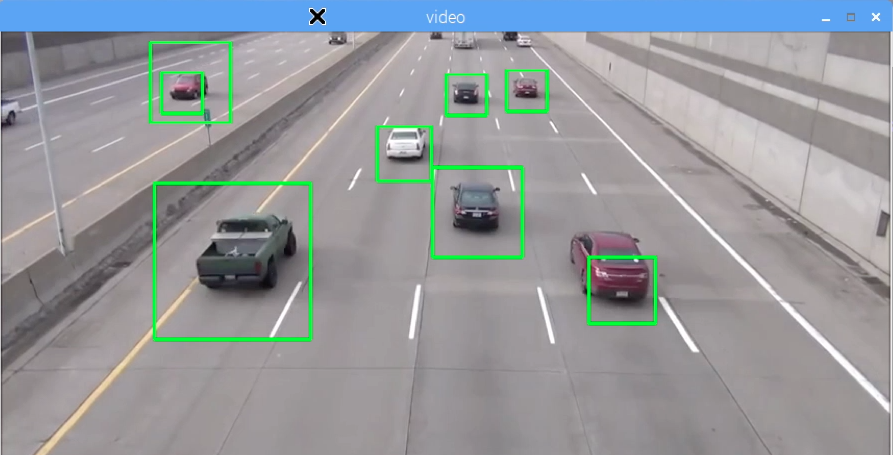
Raspberry Pi Car Detection with OpenCV

http://raspberrypi4u.blogspot.com/2018/06/raspberry-pi-car-detection-with-opencv.html


Raspberry Pi Face Detection with OpenCV

http://raspberrypi4u.blogspot.com/2018/06/raspberry-pi-face-detection-opencv.html


วันอังคารที่ 26 มิถุนายน พ.ศ. 2561

Raspberry Pi Car Detection with OpenCV


Raspberry Pi Face Detection with OpenCV

Car or Vehicle Detection is famous technology now.I'd like to use it also for the cheap one you can use raspberry pi board with openCV in python code.

Hardware

  • Raspberry Pi 3B Board with SD card and accessories.

Software and Library


check python  and openCV version


check openCV library and version


Demo 

Run python from video file.


Source Code


Reference


Making Road Traffic Counting App based on Computer Vision and OpenCV


CarND-VehicleDetection


My Website


email : info@softpowergroup.net  ,amphancm@gmail.com  Tel .+6681-6452400

Android and Arduino IoT

วันพฤหัสบดีที่ 21 มิถุนายน พ.ศ. 2561

Raspberry Pi Face Detection with OpenCV


Raspberry Pi Face Detection with OpenCV

Face Detection is famous technology now.I'd like to use it also for the cheap one you can use raspberry pi board and web camera with openCV in python code.

Hardware

  • Raspberry Pi 3B Board with SD card and accessories.
  • USB webcam

Software and Library

check python and openCV version


check openCV version


Demo


Source Code on Github
https://github.com/shantnu/Webcam-Face-Detect


Reference

https://www.hackster.io/mjrobot/real-time-face-recognition-an-end-to-end-project-a10826

https://www.hackster.io/Rjuarez7/raspberry-pi-3-face-detection-in-python-2-and-opencv-2-2b06bf

https://github.com/shantnu/Webcam-Face-Detect


My Website

email : info@softpowergroup.net  ,amphancm@gmail.com  Tel .+6681-6452400

Android and Arduino IoT